

How Mubit works
How your agents go from stateless to self-improving with Mubit's memory loop.
Mubit is a memory engine for AI agents. It stores what your agents learn, retrieves the right context before each LLM call, and extracts reusable lessons so agents improve over time. Everything runs behind a single control-plane boundary — your agent talks to Mubit, Mubit talks to storage.
Overview
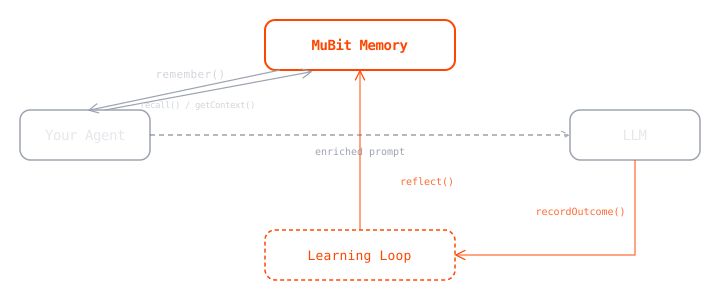
The core loop has four steps:
- Write
Your agent calls
remember()to store facts, traces, or observations as they happen. - Retrieve
Before the next LLM call,
recall()finds relevant evidence andgetContext()assembles a token-budgeted context block with rules, lessons, and facts. - Reflect
After a run completes,
reflect()extracts reusable lessons from what happened. Recurring lessons get promoted from run-scoped to session-scoped to global. A freshly reflected lesson may start as a pending candidate and is only promoted to active once its evidence score crosses the acceptance threshold (default 0.6; low-scoring ones are rejected at or below 0.25 and down-weighted), so newly learned lessons are not always surfaced instantly. This validation gate is on by default and can be disabled withMUBIT_CONTROL_LESSON_VALIDATION_ENABLED. - Reinforce
recordOutcome()feeds success/failure signals back into the lesson store, strengthening what worked and weakening what didn't.
Over multiple runs, agents accumulate lessons that make them better at the task — without retraining the LLM.
Component model
Mubit exposes three API surfaces. Most application logic belongs on the control plane.
| Surface | Responsibility | Typical use |
|---|---|---|
control | Memory lifecycle, context assembly, diagnostics, learning loop, coordination, and planning state | Default application path |
core | Direct search, sessions, scratch memory, and specialized low-level primitives | Advanced or specialized features |
auth | User and API key lifecycle | Admin and provisioning workflows |
- Start with helper-first control usage:
remember,recall,getContext,checkpoint,reflect,recordOutcome. - Introduce
core.*only when you need direct-lane or branch/session primitives. - Keep
auth.*out of end-user request handlers.
Execution contract
- Write memory with
remember()or rawcontrol.ingest. - If you use raw ingest, poll
control.get_ingest_jobuntildone=truebefore freshness-critical reads. - Read with
recall()or assemble context withgetContext()/get_context(). - Checkpoint before compaction.
- Reflect and record outcomes when the attempt finishes.
Query and context controls that matter
| Control | Why it matters |
|---|---|
run_id / session_id | Defines the memory scope |
mode on context | Chooses full, summary, or sections context assembly |
max_token_budget | Keeps context within the active model budget |
entry_types | Restricts retrieval to facts, lessons, rules, traces, and other types |
diagnose / memory_health | Explains weak retrieval and low-quality memory |
Minimal helper-first example
client.remember(
session_id="support:acme:ticket-42",
agent_id="support-agent",
content="Customer Taylor prefers concise Friday updates.",
intent="fact",
)
answer = client.recall(
session_id="support:acme:ticket-42",
query="What preference do we already know for Taylor?",
)
context = client.get_context(
session_id="support:acme:ticket-42",
query="Draft the next response.",
mode="summary",
max_token_budget=300,
)Failure modes and troubleshooting
| Symptom | Root cause | Fix |
|---|---|---|
| Recent write missing from later context | Raw ingest completion was ignored | Gate reads on done=true or use remember() |
| Context is too long or too noisy | No explicit context mode or budget | Use getContext() / get_context() with mode and max_token_budget |
| The system does not improve across attempts | Reflection or outcomes are missing | Pair reflect() with recordOutcome() |
| Security boundary drift | auth or direct core calls leaked into the request path | Keep application logic on the control plane |
Deep dives
Next steps
- Extend the same project with Add data.
- Extend retrieval behavior with Retrieve data.